
From 7 monitors to an agent in my chair
Running Claude Code multiple sessions in parallel? The bottleneck isn't the model, it's your attention. How I got out of context switching hell.
I ran up to seven screens' worth of Claude Code sessions in parallel, and the slowest part of the setup was me.
TL;DR: If you run Claude Code multiple sessions in parallel, the limit isn't the model or your hardware - it's your attention. Most developers I talk to top out at 4-7 windows because every session pulls you into a context switch. What got me out wasn't another monitor: it was one inbox for every question and, one level up, an agent sitting in the operator's chair I used to sit in.
Last year my desk had seven screens.
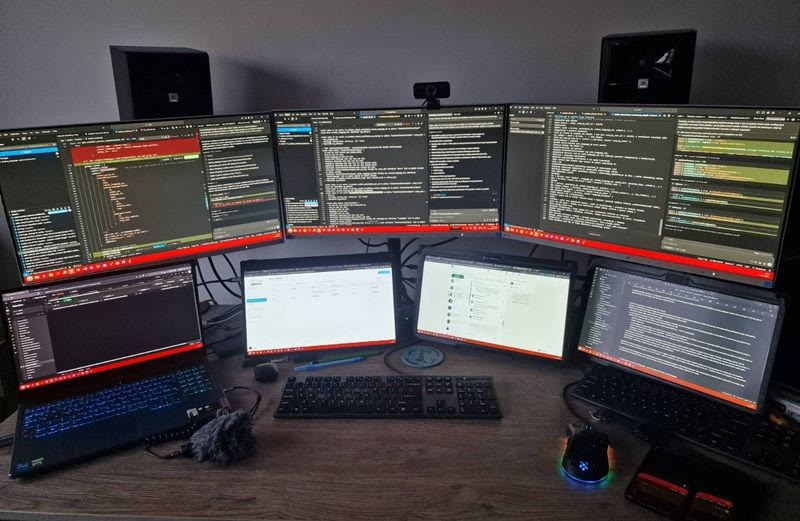
Every screen had a job. A few Claude Code sessions on the backend, a few on the frontend, one on the mobile app, one on the web panel. Logs, database, specs and notes filled the rest. I sat in the middle and routed everything.
And honestly - it worked. Features shipped fast. But by evening my head felt like it had been alt+tabbing for eight hours straight.
This post is about why I stopped working that way. Even if you never touch what I built, I hope you leave with a name for a problem you probably have, and a checklist for plain Claude Code.
What is context switching hell?
Context switching hell is what happens when you run several agent sessions in parallel: you change topic every minute, sometimes several times a minute, from one session to the next, and after a few hours your head is splitting.
Nobody warns you about it when you start running agents side by side.
Every session needs you now and then. Sometimes for a real decision. Much more often for trivia: "should I call it X or Y?", "can I run this command?", "tests failed, want me to fix them?". Each question is small. Each one costs a context switch. Backend, then mobile, then a naming question, then a failing test somewhere else. Now multiply that by seven windows.
It never shows up on any invoice. You pay in attention, not tokens 🙃
Why can't you run more than 4-7 Claude Code sessions in parallel?
When I talk to other developers, the same range keeps coming up: 4-7 windows with agents, and that's where people top out. Forum threads put it even lower, at 2-5.
That isn't a model limit and it isn't a RAM limit. It's the human brain hitting its ceiling on context switches. The bottleneck is human attention.
And there's a feedback loop that keeps you stuck. I couldn't hand agents really big, long tasks:
- the context window is finite, so a session always holds a finite amount of work
- subagents help, but they only go one level deep - no hierarchy of subagents
- the session that continues after compaction is noticeably weaker than the original
So tasks stayed small. Small tasks mean more check-ins. More check-ins mean more switching. More switching means you can't open window number eight, even if your desk has room for it.
Two things made it worse for me. The terminal: collapsed pastes, invisible images, history you can't scroll back to, and seven terminals that don't even fit on the screen. And permissions: you either skip them and risk your disk, or keep them on and get asked every minute or two - I wrote about that trade-off in Real access without the keys.
AI took the bottom layer. Where did the humans go?
Programming always had layers: interns, juniors, seniors, tech leads. Some people wrote code, others reviewed it, others decided what to build.
Since AI arrived, the bottom layer - writing code, basic review, the simple stuff - belongs to AI. And everyone moved up a level. Juniors too. The human now hands out higher-level tasks instead of typing the low-level ones. It's a bit like switching from C++ to Python.
But look at what my job had become: an operator, orchestrating 5-7 sessions for backend, frontend, mobile and web. That's the new bottom layer for humans. It's the layer the context switching lives in.
AI took the bottom layer and everyone got promoted. I wanted one more promotion: to put an agent in my chair.
Not an agent that does the work. An orchestrator that coordinates the sessions the way I did - starts them, follows up with them, checks their status - and only comes to me with what actually needs me.
Why couldn't I just do that with Claude Code?
I tried. The tools weren't there yet.
Google's A2A protocol for agent-to-agent communication exists, but it never really caught on. MCP did. And when subagents first appeared, they were what I call ephemeral: spawn one, it does a task, returns the result and dies. You couldn't follow up with it. (Claude Code supports follow-ups to subagents now, to be fair.) They're also one level deep. And it matters: an agent that already has the whole problem in its head can make a small fix in a minute, while a fresh one has to gather all that context again from zero.
I tried hacking around it with a skill that let Claude start more sessions through the claude CLI. It stayed a small experiment, and I dropped it.
Later I learned that the messaging part is much harder than "agent A talks to agent B" - when does a message land, where does the reply go, how do you keep threads from tangling. That one deserves its own post.
The other half of the answer is that every Claude Code session starts from zero: you define the prompt, and in a sense the agent's whole existence, again and again. What I wanted instead was an agent with a fixed role and its own desk that survives sessions - one that does git pull and gets to work, just like a human.
What actually gets you out of context switching hell?
More monitors didn't fix it. I had seven.
What worked was changing where the questions land. One inbox. Every question, decision, expired credential and approval request from every session, in one place - instead of popping up in whichever terminal or IDE window happened to produce it. Even in VS Code or Cursor, those windows don't fit on the screen, and notifications were scattered across sessions.
With one inbox the direction flips. You stop chasing sessions. The questions wait for you instead of you waiting for them. I come by when I have time, click through what's piled up, and the agents keep going.
And because it's asynchronous, it doesn't care where I am. I wanted agents that keep working when I close the laptop lid, go for a walk and answer them from my phone a couple of times. With seven monitors I had to be at the desk. With an inbox I don't.
The market is getting there too: centralized inboxes for agents are only now becoming normal - tools like T3 Code and Herdr have them. If you take one thing from this post, take this: optimize where the questions land, not how many sessions you can keep open.
What I learned along the way
- The bottleneck is human attention, not the model. Adding sessions without changing where the questions go just moves you deeper into context switching hell.
- Small tasks are a symptom. If you check in on an agent every few minutes, it's usually because it can't hold a bigger task - context window, one level of subagents, weaker sessions after compaction.
- Many sessions of one agent on one workspace are a superpower. I was afraid they'd trip over each other. Months of git worktrees in Claude Code had already shown me they don't.
- A role beats a mega-prompt. "You're a tester" carries a whole mental model the model already has. Shorter to write and easier to reason about.
- Memory is simpler than I thought. A persistent desk, plain notes files and search over past sessions turned out to be enough.
Checklist: running Claude Code multiple sessions in parallel without frying your head
No magic here, just things that cut the switching on plain Claude Code:
- Count your windows honestly. If you're above 4-7 and feel fried, the fix is routing, not willpower.
- Swap raw terminals for a multi-session UI - T3 Code, Herdr or Cezar by Open Mercato. Many sessions side by side, with statuses. It only fixes part of context switching hell, but a real part.
- Send every "needs you" to one place. Claude Code has a
Notificationhook - point it at one channel (your phone, a single window) instead of watching seven. - Use git worktrees for parallel sessions on the same repo, so they don't step on each other.
- Give each session a role - a predefined subagent or a separate
CLAUDE.md- instead of retyping the same prompt every morning. - Let agents keep notes in files in the repo. That's your memory system, and it's what lets a session pick up a bigger task tomorrow.
- Approve less by blocking more. Hard limits in
PreToolUsehooks mean fewer "can I run this?" questions, without skipping permissions globally. - Read the transcript, not the summary, when something goes wrong - otherwise you'll context-switch twice: once to notice, once to find out what actually ran.
So I built it
All of this turned into ARPOS, which I've been building since early March: agents with a fixed role and their own desk, one inbox for every decision, and agents that hand work to each other - so there's finally someone else in my chair. When it runs on Claude Code, that's plain, unmodified Claude Code - no fork, no patches. Every line of it was written by agents, which still feels a bit absurd.
It's available from December at arpos.ai 🔥
FAQ
How many Claude Code sessions can you run in parallel?
Technically, as many as your machine and plan allow. Practically, most developers I talk to top out at 4-7 windows, and forum threads suggest 2-5. The limit is your attention, not the tool.
What is context switching hell?
Context switching hell is what happens when you run several agent sessions in parallel: you change topic every minute, sometimes several times a minute, from one session to the next, and after a few hours your head is splitting.
Do more monitors help?
Up to a point. They save alt+tab, but every session still interrupts you. I went up to seven screens; what actually helped was one inbox for all questions and approvals.
Can a Claude Code agent orchestrate other Claude Code sessions?
Subagents give you one level and, these days, follow-ups. A real orchestrator that starts, follows up with and checks on long-lived sessions needs session tools and a messaging design on top.
Should I use git worktrees for parallel sessions?
Yes. It's the simplest way to let several sessions work on one repo without overwriting each other, and it's what convinced me that many sessions of one agent on one workspace is safe.